







Learn the fun way

Learn Korean by reading your favourite Webtoons.

Webtoons are pictures, not text — so Sori reads them. Grab any part of a panel (or just select the text and right-click), get the word's meaning in context, and send it straight to flashcards. Learn Korean from the stories, shows and songs you already love — read, watch or listen.

  • Set up in minutes
  • Chrome & Firefox
  • Works on image-based webtoons
EP. 12 · 밤Saved 0

그녀는 어둠 속에서 나를 불렀다.

read from image
Panel 1 / 3
Recognised text

.

“She called out to me from the dark.”

tap a word Sori read ↑

nounverbadjectiveadverbpronounparticle
어둠
[eo-dum]
noun

darkness, the dark

그녀 어둠 속에서 불렀다.

“She called out to me from the dark.”

How it works

Three taps from reading to remembering.

No textbooks, no flashcard chores. The lesson is just the next episode.

01

Read like always

Open any Korean webtoon or web novel. Sori waits in the corner until a word trips you up.

02

Grab what stops you

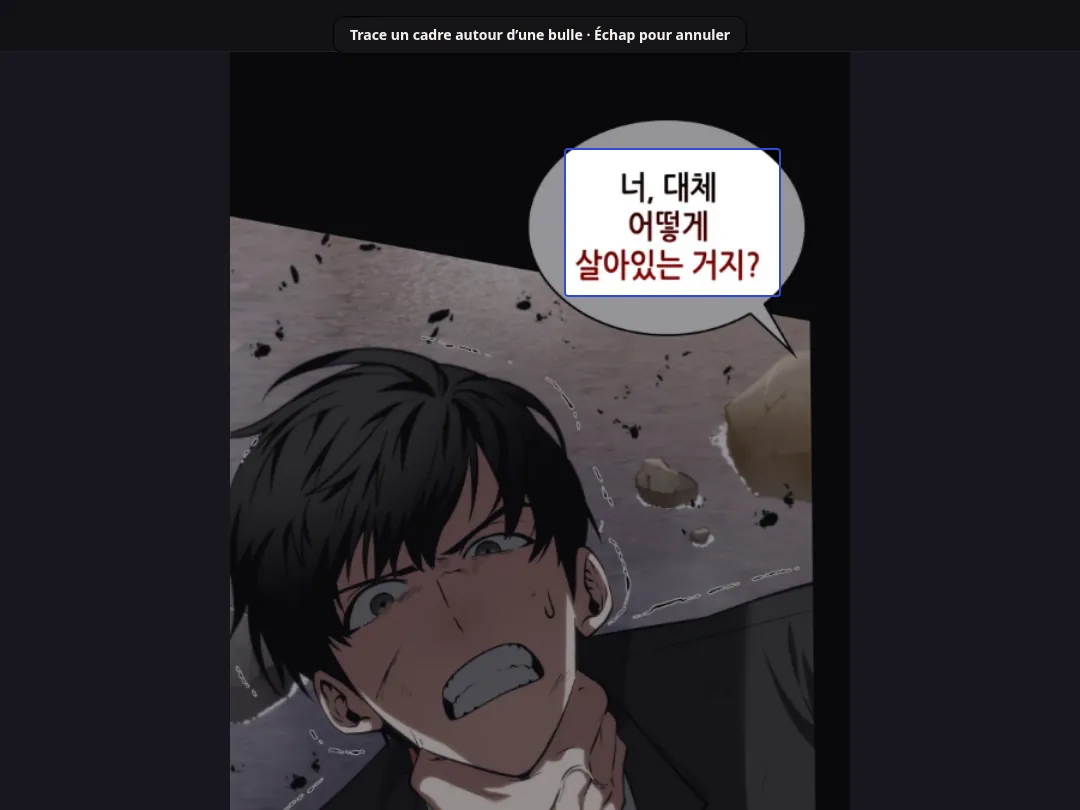
Drag across the part you don't get — Sori reads the Korean right off the image, no selectable text needed. On pages where the text is selectable, just highlight it and right-click Sori from the menu.

03

It becomes a flashcard

One more tap saves the word with the line it came from. Sori schedules the reviews so it actually sticks.

See it in action

This is what reading with Sori looks like.

Three steps, one flow — capture, understand, remember. Tap through it.

Step 1 / 3

Grab the words right off the panel

Drag a box over any part of a webtoon and Sori reads the Korean inside it — even though the page is just a picture. Reading a web novel instead? Just select the text and right-click Sori.

  • Works on image-only webtoons
  • Select & right-click on real text
  • No copy-paste, no retyping
comic.naver.com/webtoon · 소리 is reading

Capture selection

A selection box being dragged over a Korean webtoon panel.

public/screenshots/capture.png
Capture selection
What's inside

A dictionary, a tutor, and a deck — in one grab.

Everything fires the moment you point at a word. Learning should feel this easy.

Reads the image, not just text

Webtoons are pictures, so you can't select the words. Sori captures the part you pick and pulls the Korean straight out of it — and where the text is selectable, just highlight it and right-click Sori.

Spaced-repetition flashcards

Every word you save comes back at the right moment, paired with the line you first met it in.

Real example sentences

Your examples come from your stories — lines you've actually read, not invented textbook filler.

Hear every word

Native pronunciation on tap, so reading builds your ear too. That's the 소리 in Sori.

Private by default

Sori only reads the spot you point at. What you read stays yours — no account needed to start.

Why Sori

Learn Korean the fun way.

Built for webtoon readers, not textbooks. The fastest way to learn a language is to stop noticing you're studying — so Sori meets you inside the cliffhangers.

Get started

Start learning from the stories you love.

Create a free account, install the extension, and your first words land in your deck today.

Create your free account
Questions

Good to know.

How does it work if webtoons are images?+

That's the whole point. Most webtoons are pictures, so highlighting text does nothing. Sori captures the area you choose and recognises the Korean inside it — then defines it and saves it for you. And on pages where the Korean is real, selectable text, you can skip the capture entirely: highlight it and right-click Sori from the menu.

Which browsers does it work in?+

Chrome and Firefox, with Edge following close behind.

Which sites are supported?+

It's tuned for Naver Webtoon, Webtoon, Munpia and Naver Series, and works on most other pages — image or text — with Korean on them.

Do I need an account to read?+

No. You can read and look up words without signing up. An account only comes in when you want flashcards synced across devices.

How much does it cost?+

$9.99 a month, or $84 a year — that's $7 a month, 30% off. Prefer to pay once? Lifetime access is $300, one payment, every future update included. See the pricing page for details.